The service business landing page checklist
Use this before you spend another dollar sending ad traffic to a page. Most failures are small, visible and quick to fix.
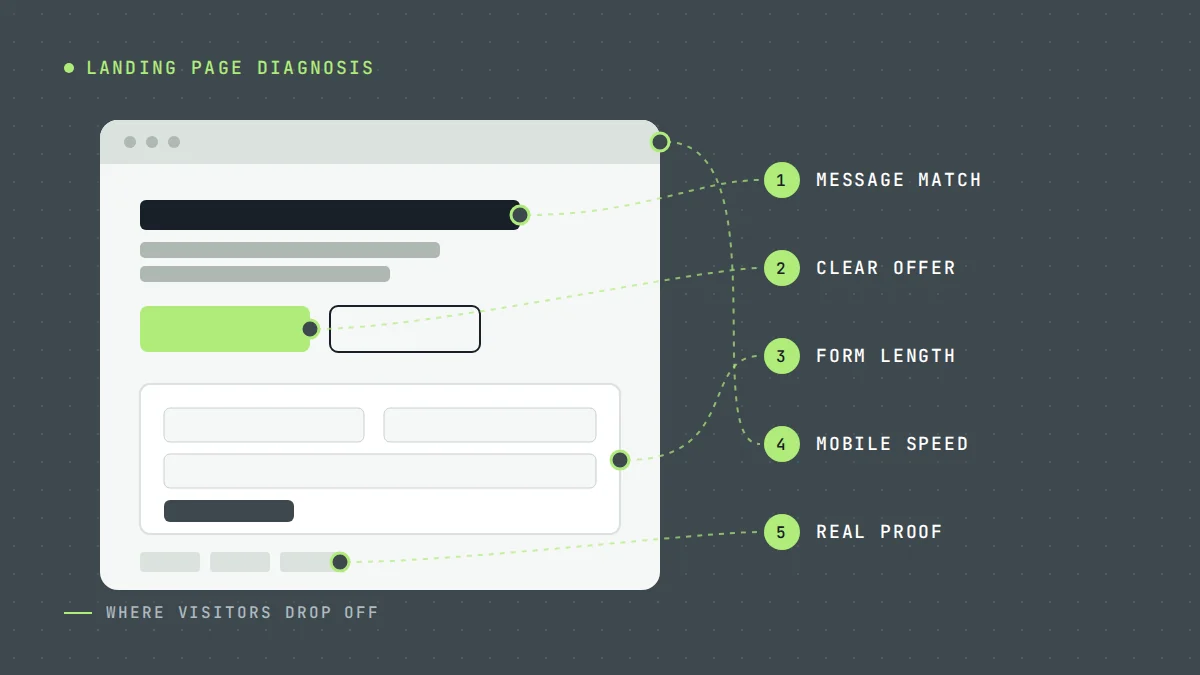
Paid traffic is expensive. Sending it to a page that loses most visitors is the fastest way to waste an ad budget. This checklist is what we use when we first look at a service business landing page.
Open your page on your phone, and work through it.
What the visitor sees first
- The headline matches the ad. If the ad says "Emergency plumber in Austin", the page says it too.
- The service is obvious in three seconds. No clever slogans in place of a plain description.
- The location is clear. Name your service area near the top.
- There is a next step above the fold. A call button, a form, or both.
- The phone number is tappable on mobile, and shown in the header.
- No navigation menu leading visitors away, or a very minimal one.
What convinces them
- Reviews with names and places. Real reviews, ideally from your Google profile. See how reviews affect conversion rate.
- Photos of your team and real jobs. Not stock photography.
- Credentials. Licences, insurance, certifications and guarantees, stated plainly.
- A short process. Three or four steps: you enquire, we call, we quote, we do the work.
- Answers to common objections. Price range or how quoting works, timing, what happens on the first visit.
- A human. A name and a face, especially for owner-operated businesses.
What makes it easy to act
- A short form. Name, phone, service needed and postcode is enough for most trades. Read how many form fields a lead form should have.
- Clear button text. "Get my free quote" beats "Submit".
- What happens next is stated next to the form.
- A thank-you page that confirms the enquiry and sets a callback time.
Technical checks
- Loads quickly on mobile data. Test with PageSpeed Insights. Compress images and remove unused scripts.
- Forms work. Submit a test lead every week. Broken forms are more common than you would think.
- Tracking fires. Form submissions, calls and thank-you page views are recorded in Google Ads, Meta and analytics.
- Source data is captured. UTM parameters and click IDs are saved with each lead, so you can connect customers back to campaigns.
Quick test
Hand your phone to someone who has never seen the page. Ask them what you do, where, and how to get in touch. If they cannot answer all three in ten seconds, start at the top of this list.
Where to start
Pick the three checks your page fails most clearly and fix those first. For deeper diagnosis, read why your landing page is not generating enough leads.
We build and test landing pages as part of our lead generation systems. Request a free audit and we will run this checklist on your page.
Questions owners ask
Should I send ads to my homepage?
Usually not. A dedicated landing page for each main service converts better because it matches the ad and removes distractions.
How long should a landing page be?
Long enough to answer the visitor's main questions. Emergency services can be short; considered purchases like solar or roofing usually need more proof and detail.
Do I need a separate page for every service?
For your main paid services, yes. A page about water heater replacement will convert water heater searches better than a general plumbing page.
What should a contractor landing page include?
A headline that repeats the service and area from the ad, a phone number people can tap, a short form, proof such as reviews and photos of real jobs, license or insurance details where they matter, and one clear next step. Everything else is optional, and a lot of it gets in the way.
Sources
Want us to look at your own numbers?
Get a free lead generation audit. We will review your ads, landing pages and tracking, and show you where enquiries are slipping away. If nothing is broken, we will tell you that too.

LeadWise MarketingAn owner-operated lead generation agency based in Cape Town, South Africa, working with service businesses across the United States and Europe. More about LeadWise.